Android Autofill & Passkeys
This page explains how autofill and passkeys work in the AliasVault Android app.
Android Autofill APIs
Android has introduced several autofill mechanisms over the years, including the Autofill Framework, Inline Autofill, and Accessibility-based autofill. Because apps and browsers support these technologies differently, there is no single autofill solution that works consistently across all Android devices and applications.
AliasVault supports the modern Android autofill APIs recommended by Google, but some apps and browsers may not fully support third-party password managers. As a result, autofill behavior can vary depending on your device, Android version, browser, and the app you're using.
Accessibility Autofill deprecated
Some password managers still use Accessibility-based autofill as a fallback in situations where standard autofill is unavailable. We have chosen not to implement this approach. Google has increasingly discouraged the use of Accessibility APIs by password managers and recommends using dedicated autofill APIs whenever possible. Building on Accessibility-based autofill could lead to compatibility, policy, or maintenance issues in future Android releases.
For the best experience, we recommend using browsers that support Android's modern Autofill Framework, such as Chrome, Brave, Edge, Vivaldi, or Firefox.
For additional background and technical details, see GitHub issue #2088: https://github.com/aliasvault/aliasvault/issues/2088.
If you're running into any specific issues with your specific device make/model, please read the tips below. If your issue is not mentioned on this page, feel free to raise an issue on GitHub or get in contact via Discord.
Passkeys
Starting with Android 14, Google introduced the Credential Manager API which enables passkey creation and authentication. AliasVault supports passkeys on Android 14 and later through this API.
Passkey Support Status
Passkeys are supported in most places for both creation and authentication. However, there are some limitations:
Supported:
- ✅ Passkey creation (registration)
- ✅ Passkey authentication (login)
- ✅ Most browsers and apps that use Android Credential Manager
Not Yet Supported:
- ❌ PRF Extension: The PRF (Pseudo-Random Function) extension is currently not supported on Android due to Android Credential Manager restrictions. Only Google Password Manager or hardware passkeys like YubiKey support PRF at this moment. When Android adds support for third-party credential providers to advertise PRF capabilities, AliasVault will implement it.
The PRF extension is fully supported in AliasVault's browser extension and iOS app. The Android limitation is specific to the platform's Credential Manager API.
Using Native Autofill in Chrome
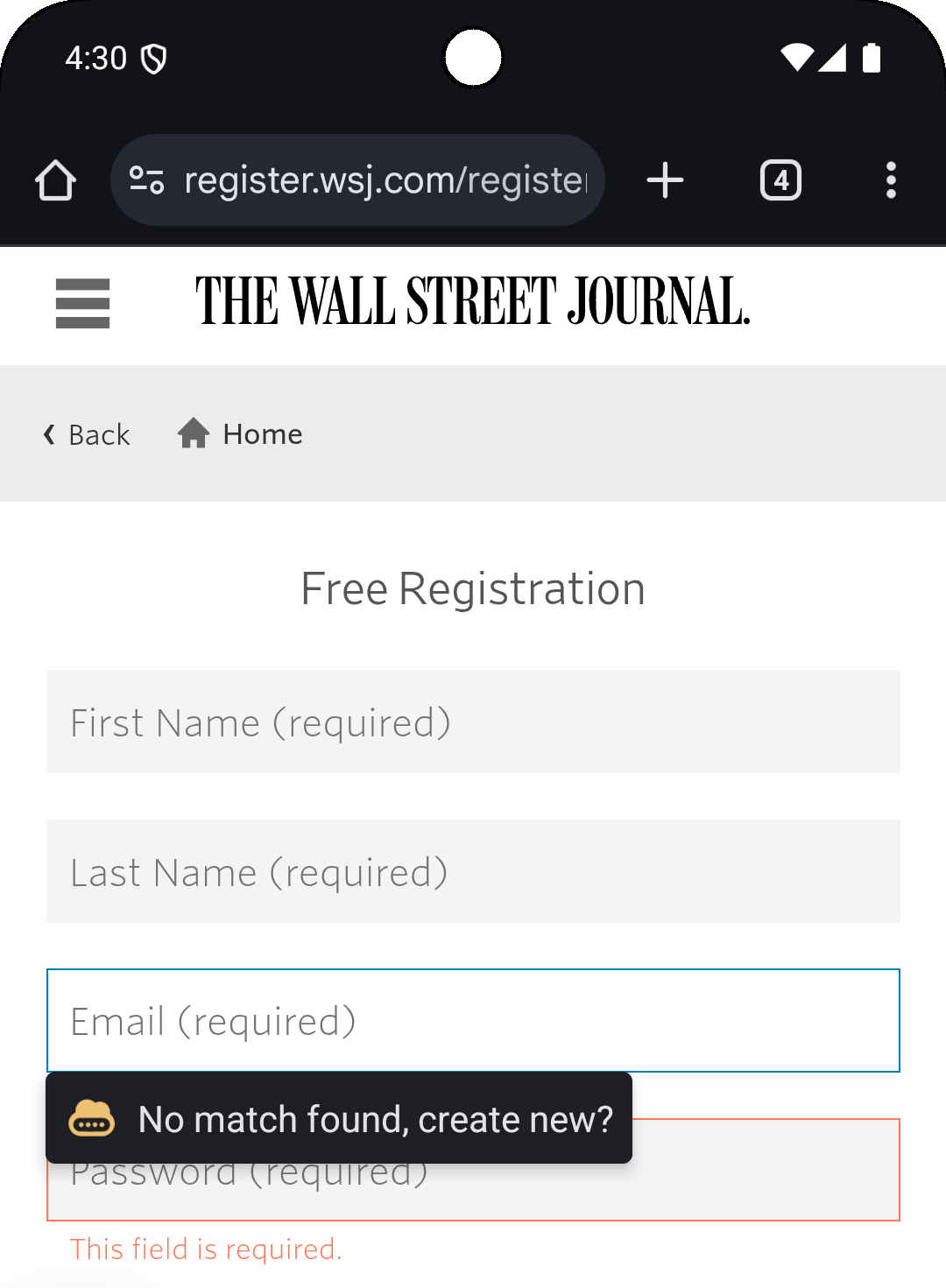
Currently AliasVault implements the Native Autofill API which shows an autofill popup on supported input fields. The Chrome browser on Android from version 135 onwards support native autofill via third party apps. However you need to enable this manually.
To configure AliasVault as the autofill provider in Chrome:
- Open Chrome
- Go to Menu > Settings > Autofill services
- Choose the option
Autofill using another service
When you have correctly set up native autofill it should look like the examples below. Whenever you focus on a username, email or password field, the autofill popup will be triggered:

Frequently Asked Questions
Chrome Autofill Issues
Autofill suggestions stopped appearing in Chrome
If you notice that autofill suggestions have stopped appearing in Chrome, this is often due to a Chrome process issue rather than an AliasVault problem. To resolve this:
- Fully close the Chrome browser on your Android device
- Reopen Chrome
This simple restart of the browser process typically resolves the issue and restores autofill functionality.